Introduction
Enterprise adoption of artificial intelligence tools is accelerating as organizations seek to automate workflows, accelerate software development, and refine customer interactions. Modern AI applications extend beyond simple conversational assistants, embedding deeply into core operations ranging from software development and customer relationship management to enterprise data governance. Selecting the appropriate platform poses significant challenges due to security concerns, integration friction, and fragmented software markets. Technology leaders must evaluate tools through the lens of concrete operational problems rather than vendor hype, recognizing that no single application fits every organizational requirement. This guide explores major AI categories, security architectures, pilot execution frameworks, and evaluation strategies to empower confident, long-term software investments. Readers will discover clear methodologies for shortlisting vendors, managing total cost of ownership, and utilizing independent platforms like TrueReviewNow to streamline their software comparison process.
What Are AI Tools for Business?
Enterprise AI tools differ significantly from consumer-facing applications because they prioritize data security, system integration, governance, and organizational scalability over simple text generation. These platforms encompass diverse architectures, including general generative AI assistants, business automation platforms, enterprise search systems, and autonomous AI agents designed to execute multi-step workflows. Modern organizations also deploy customer-service bots, AI-assisted software development environments, advanced data analytics engines, AI governance suites, model-management platforms, and specialized LLM infrastructure. Consumer tools operate in isolated, public environments, whereas business-grade AI demands robust tenant isolation, continuous reliability, enterprise identity management, complex API connectivity, and compliance with global privacy regulations. Consequently, implementing enterprise software requires evaluating how effectively an application safeguards proprietary data while seamlessly integrating into established business processes.
Why Businesses Are Investing in AI Tools
Organizations invest in artificial intelligence to drive operational efficiency, accelerate decision-making, and unlock enterprise knowledge buried within unstructured data repositories. By automating repetitive administrative tasks, teams enhance productivity, shorten sales cycles, streamline software development, and deliver personalized customer service at scale. Advanced analytics engines empower business leaders to discover actionable insights, support complex research, optimize financial forecasting, and scale internal processes without proportional headcount growth. However, achieving tangible business value from these applications requires more than software deployment; it demands deliberate workflow design, rigorous data quality management, continuous employee adoption, and continuous performance measurement.
What Makes an AI Tool Enterprise-Ready?
Business Relevance
An enterprise-ready tool must directly solve a measurable operational problem, demonstrating clear alignment with organizational goals rather than functioning as an experimental technology project.
Security and Privacy
Robust enterprise solutions enforce end-to-end encryption, strict tenant data isolation, zero data retention policies for public models, regional data residency compliance, and clear guarantees against training vendor models on proprietary corporate data.
Identity and Access Management
Enterprise platforms must integrate seamlessly with central identity systems, supporting Single Sign-On (SSO), granular Role-Based Access Control (RBAC), automated SCIM user provisioning, domain enforcement, and flexible workspace permissions.
Integration Capabilities
High-value software provides extensive application programming interfaces (APIs), software development kits (SDKs), pre-built native connectors, and webhooks to connect smoothly with cloud repositories, enterprise applications, and automated workflow orchestrators.
Governance and Observability
Comprehensive solutions offer detailed audit logging, real-time usage analytics, centralized prompt controls, automated approval workflows, cost monitoring dashboards, and guardrails to evaluate output quality and maintain policy enforcement.
Scalability and Reliability
Scalable architecture ensures consistent system response times, high regional availability, robust fallback systems, and uninterrupted service continuity as user concurrent request volume scales across global departments.
Total Cost of Ownership
Calculating true financial impact requires looking past initial subscription rates to account for API usage costs, custom integrations, enterprise implementation fees, governance oversight, administrative overhead, user training, and ongoing technical maintenance.
Major Categories of AI Tools for Business
General-Purpose AI Assistants
General-purpose assistants support employee workflows by summarizing lengthy reports, conducting deep preliminary research, drafting business communications, analyzing complex documents, and assisting with creative brainstorming across departments.
Workplace Productivity AI
Productivity suites integrate directly into everyday office applications to generate real-time meeting summaries, compose email responses, construct presentations, analyze spreadsheet trends, and power intelligent enterprise document search.
Customer Service and CRM AI
Customer-facing platforms power intelligent self-service portals, assist support agents with case summarization, automate sales lead qualification, streamline CRM data updates, and generate tailored sales follow-up messages.
Software-Development AI
Development platforms accelerate engineering workflows through context-aware code completion, instant bug identification, automated test generation, repository analysis, refactoring assistance, and comprehensive pull-request documentation.
Process Automation and AI Agents
Autonomous agents streamline cross-application operations by orchestrating document processing, automating employee onboarding workflows, handling complex insurance claims, expediting order processing, and managing back-office finance operations.
Data and Analytics AI
Data-focused tools democratize business intelligence by allowing non-technical users to perform natural-language database queries, generate automated forecasts, extract structured insights from unstructured files, and deploy analytical agents.
AI Infrastructure and Governance Tools
Infrastructure suites provide central engineering teams with intelligent model routing, centralized prompt management, MLOps orchestration, security policy enforcement, cost management, and comprehensive observability across all enterprise models.
Comparison of the Best AI Tools for Business
| AI Tool | Best For | Main Strength | Enterprise Consideration |
| ChatGPT Enterprise | Multi-department productivity | Versatile task assistance | High subscription tiers |
| Microsoft 365 Copilot | Office ecosystem integration | Native suite compatibility | Requires clean permissions |
| Google Gemini | Google Workspace workflows | Multimodal data handling | Ecosystem lock-in risks |
| Salesforce Agentforce | Sales and service automation | Autonomous agent workflows | Requires curated CRM data |
| ServiceNow Now Assist | IT and service management | Incident resolution speed | Complex initial deployment |
| GitHub Copilot | Engineering acceleration | Inline code suggestion | IP scanning configurations |
| UiPath | Robotic process automation | Legacy system integration | High infrastructure setup |
| Snowflake Cortex AI | In-database analytics | Zero data movement analysis | Compute consumption costs |
Note: Software capabilities, pricing tiers, and service features evolve constantly. Organizations should verify current specifications directly with vendor documentation prior to making final procurement commitments.
Detailed Review of Leading AI Tools
ChatGPT Enterprise
ChatGPT Enterprise provides high-speed access to advanced models, providing an adaptable environment for writing, document analysis, research, and technical brainstorming across administrative departments.
Best business applications include drafting executive communications, translating technical documentation, summarizing extensive financial filings, brainstorming campaign concepts, supporting market research, and conducting advanced multi-format data analysis.
Key strengths center on top-tier natural language processing capabilities, intuitive user adoption interfaces, comprehensive admin controls, zero training on corporate data, and strong security compliance credentials.
Enterprise considerations include managing ongoing user license costs, setting up governance controls around data exports, avoiding user reliance on unverified answers, and establishing proper prompt usage guidelines.
Best suited for organizations seeking an adaptable, multi-department productivity assistant that requires minimal specialized onboarding for non-technical employees.
Microsoft 365 Copilot
Microsoft 365 Copilot embeds generative assistance directly into enterprise applications like Word, Excel, Teams, and PowerPoint, using organizational data stored within the Microsoft graph.
Best business applications include auto-generating meeting action items, drafting document outlines, summarizing long email threads, creating slide decks from raw text, analyzing spreadsheet data, and searching corporate SharePoint files.
Key strengths stem from seamless integration into everyday productivity applications, enterprise identity management compatibility, automated document permission compliance, and continuous administrative familiarity.
Enterprise considerations revolve around strict requirements for underlying data hygiene, potential information exposure if file permissions are mismanaged, prerequisite licensing dependencies, and ongoing adoption monitoring.
Best suited for enterprises deeply committed to the Microsoft cloud ecosystem looking to enhance administrative productivity without introducing standalone user applications.
Google Gemini Enterprise
Google Gemini Enterprise brings broad multimodal processing capabilities directly into Google Workspace, enabling teams to synthesize text, audio, images, and codebase structures efficiently.
Best business applications include drafting document responses in Docs, building automated email workflows in Gmail, building customized analytical sheets, processing video records, and organizing shared Drive research.
Key strengths involve native Google Workspace integration, exceptional contextual context windows for long documents, multimodal intelligence capabilities, and robust enterprise-grade security structures.
Enterprise considerations demand strict management of corporate Google Cloud project structures, clear admin data boundary configurations, user education across varying model capabilities, and usage monitoring.
Best suited for organizations using Google Workspace as their primary productivity environment that require advanced long-document analysis and intuitive file intelligence.
Salesforce Agentforce
Salesforce Agentforce equips sales, marketing, and support teams with autonomous AI agents capable of executing multi-step business actions within the CRM ecosystem.
Best business applications involve handling incoming customer service inquiries, summarizing sales opportunities, automating follow-up task creation, assisting agent responses, and tracking pipeline changes.
Key strengths focus on deep, native operational context within enterprise CRM records, proactive agent decision capabilities, extensive workflow triggers, and robust transactional boundary controls.
Enterprise considerations include clean baseline data requirements within Salesforce objects, potential API usage scaling costs, detailed agent testing requirements, and change management efforts for sales reps.
Best suited for sales and support organizations managing heavy customer engagement workflows within the Salesforce application environment.
ServiceNow Now Assist
ServiceNow Now Assist applies intelligence directly to IT service management, HR service delivery, and enterprise workflow execution to resolve incidents faster and reduce ticket backlogs.
Best business applications encompass automated IT incident summarization, draft response generation for HR service tickets, intelligent search across internal knowledge bases, and code generation for platform workflows.
Key strengths include native integration into core enterprise service desk workflows, significant reduction in mean time to resolution (MTTR), and pre-packaged domain-specific operational workflows.
Enterprise considerations center on substantial platform implementation requirements, platform licensing additions, necessary knowledge base curation, and continuous monitoring of automated resolution steps.
Best suited for large IT organizations seeking to automate internal service management, streamline helpdesk workflows, and accelerate incident remediation.
GitHub Copilot
GitHub Copilot operates directly within integrated development environments (IDEs) to suggest code snippets, generate automated software tests, and assist software engineers with complex code refactoring.
Best business applications include inline code completion, unit test suite generation, pull request description drafting, legacy codebase explanation, bug identification, and real-time documentation assistance.
Key strengths deliver significant acceleration in developer output velocity, reduced operational friction, seamless integration with primary code editors, and flexible contextual awareness.
Enterprise considerations involve configuring strict public code matching filters, establishing intellectual property compliance rules, managing developer code reviews, and tracking overall code quality metrics.
Best suited for engineering departments looking to boost software development efficiency, reduce repetitive coding tasks, and accelerate developer onboarding times.
UiPath Business Automation Platform
UiPath combines generative capabilities with established robotic process automation (RPA) tools to automate complex, multi-step business tasks across both modern APIs and legacy software systems.
Best business applications include automated document processing for invoices, complex financial reconciliation, employee onboarding workflows, insurance claims intake, and cross-system database updates.
Key strengths involve bridge capability between legacy user interfaces and modern AI models, robust enterprise governance controls, deep workflow orchestration features, and audited execution logs.
Enterprise considerations require dedicated automation architecture expertise, initial process discovery investments, long-term bot maintenance plans, and carefully managed exception-handling flows.
Best suited for large enterprises operating legacy software systems that require reliable end-to-end process automation combined with intelligent document extraction.
Snowflake Cortex AI
Snowflake Cortex AI delivers fully managed AI models directly inside enterprise cloud data platform, allowing data teams to run advanced analytics without exposing raw data externally.
Best business applications include running natural language processing queries over massive data lakes, generating instant text summaries from structured records, building analytical apps, and running sentiment analysis.
Key strengths revolve around zero data movement security architectures, high processing throughput over large datasets, easy SQL function integrations, and native enterprise data governance enforcement.
Enterprise considerations include managing Snowflake compute credit usage costs, optimizing database query structures, ensuring underlying data hygiene, and training data teams on integrated SQL functions.
Best suited for data engineering and analytics departments aiming to build scalable analytical applications on top of their secure enterprise cloud warehouse.
Enterprise AI Tool Evaluation Framework
| Evaluation Area | Questions Businesses Should Ask |
| Business Fit | Does the tool solve a clear operational problem with clear ROI potential? |
| Data Privacy | Where are prompts, files, and outputs processed, and are they protected from training? |
| Security | Does the application support enterprise SSO, granular RBAC, and data isolation? |
| Integration | Can the platform connect securely to internal data sources and core applications via APIs? |
| Accuracy | How are outputs evaluated, monitored, and guarded against hallucination risks? |
| Scalability | Can the software infrastructure sustain unexpected spikes in user activity across global regions? |
| Governance | Are complete audit logs, user permission controls, and cost dashboards built into the admin console? |
| Cost | Are subscription tiers, compute consumption rates, and API usage fees clear and predictable? |
| Customization | Can teams safely tune prompts, upload context, modify agents, and restrict knowledge bases? |
| Reliability | What service fallback mechanisms exist when a vendor model experiences regional downtime? |
| Support | Does the vendor offer enterprise service level agreements (SLAs) and dedicated support teams? |
| Exit Strategy | Can configurations, custom prompt libraries, historical audit logs, and data be easily exported? |
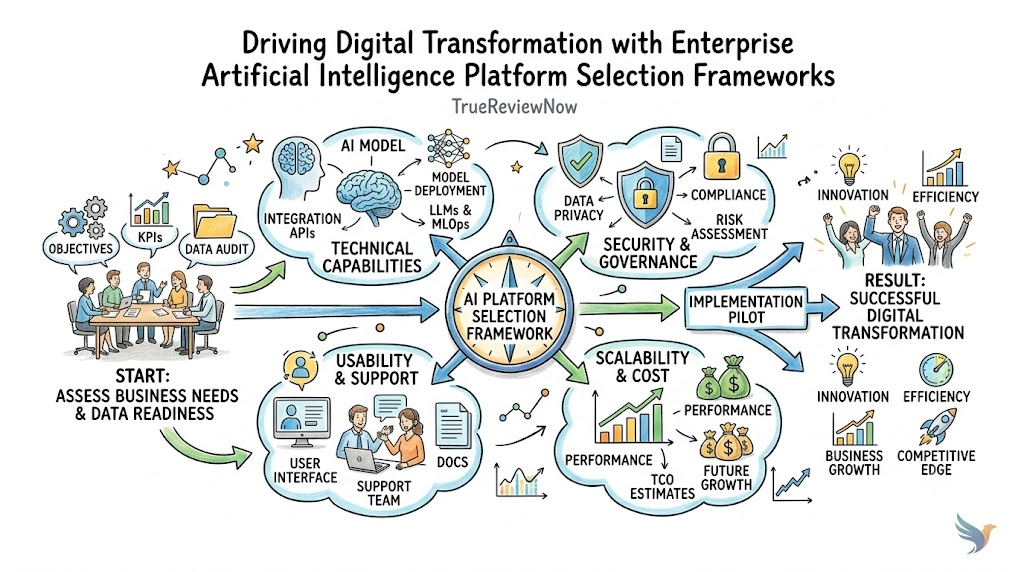
An effective evaluation framework balances technical capabilities with practical business requirements. Assessing business fit ensures that procurement decisions target operational bottlenecks rather than novelty features. Verifying data privacy, platform security, and integration options protects sensitive corporate assets while preventing isolated software silos. Accuracy checks, system scalability tests, and administrative governance capabilities guarantee that deployed tools remain trustworthy and manageable as user adoption expands. Finally, analyzing total cost factors, customization options, vendor reliability standards, and exit strategies prevents costly vendor lock-in and protects long-term digital investments.
How to Select the Right AI Tool for Your Business
Define the Business Problem
Successful AI selection begins by identifying a clear business challenge rather than selecting software based on marketing claims. Organizations must clearly map existing process flows, calculate baseline operational costs, identify key user groups, determine acceptable risk levels, and establish measurable success metrics prior to reviewing market options.
Review the Existing Technology Environment
Buying decisions should build upon existing enterprise software investments across Microsoft, Google, Salesforce, ServiceNow, cloud infrastructure, and data platforms. Utilizing native additions within existing ecosystems often reduces security review delays, simplifies identity management, lowers integration costs, and accelerates overall user adoption.
Create a Vendor Shortlist
Teams should build a vendor shortlist by dividing capabilities into mandatory security requirements, preferred functional features, and optional enhancements. Evaluating software platforms through dedicated review platforms like TrueReviewNow helps technology procurement teams rapidly isolate verified software options, compare core capabilities, and examine unbiased enterprise use cases.
Run a Controlled Pilot
Before rolling out software enterprise-wide, conduct a controlled, time-bound pilot with representative business teams, realistic corporate datasets, and complex edge cases. Assess how the software manages security parameters, test error rates, gather authentic end-user feedback, monitor API expenditure, and verify human override controls under real operational conditions.
Compare Total Cost of Ownership
Comprehensive financial evaluations must look beyond initial subscription fees to calculate ongoing internal costs. Procurement leaders must factor in professional services fees, custom API integration costs, underlying cloud infrastructure usage, administrative governance overhead, internal training resources, and continuous vendor support commitments.
Plan for Long-Term Governance
Establishing long-term platform value requires defining clear software ownership, scheduling periodic administrative access reviews, creating incident escalation rules, updating platform permissions, monitoring cost allocations, and maintaining clear criteria for decommissioning obsolete tools.
Important Metrics for Measuring AI Business Value
Determining real software return on investment requires focusing on business outcome metrics rather than vanity activity indicators. Tracking raw prompt volumes, total generated words, or log-in counts does not demonstrate actual organizational value.
- Task completion speed improvements across specific administrative functions.
- Reduction in customer service ticket handling times and escalation rates.
- Human acceptance rate of AI-generated content, code, or recommendations.
- Autonomous workflow completion percentages without manual intervention requirements.
- Output error rates and hallucination frequency identified during quality checks.
- User adoption trends and active user retention rates across target departments.
- Average financial cost incurred per successfully automated operational outcome.
- Customer satisfaction scores (CSAT) following automated or agent-assisted service interactions.
- Software developer cycle times from initial task assignment to code production.
- Measureable expansion in total departmental throughput without headcount increases.
Common Mistakes Businesses Make When Buying AI Tools
- Buying without clear use cases: Purchasing licenses before defining operational requirements leads to poor adoption and wasted budget. Always identify target bottlenecks first.
- Relying solely on vendor demos: Vendor demonstrations present ideal conditions. Always test tools on real, complex corporate data during controlled pilot phases.
- Ignoring underlying data quality: AI applications produce poor outputs when connected to unorganized databases. Clean internal documentation before executing integrations.
- Granting excessive permissions: Assigning broad data access rights to autonomous agents creates serious security risks. Always apply strict least-privilege policies.
- Bypassing security and legal teams: Omitting risk management teams early leads to compliance failures and abrupt project delays. Engage security teams from day one.
- Measuring activity instead of impact: Counting active users or generated text ignores true business value. Track operational time savings and financial return on investment.
- Underestimating integration friction: Assuming modern APIs connect effortlessly leads to budget overruns. Fully audit existing IT architectures before signing contracts.
- Neglecting employee enablement: Deploying software without practical role-based training results in user resistance. Invest in comprehensive change management initiatives.
- Purchasing overlapping applications: Buying standalone software tools that duplicate native features in existing enterprise suites increases complexity. Audit software stacks regularly.
- Removing human accountability: Allowing automated agents to execute high-risk actions without review causes costly mistakes. Maintain human review steps for critical processes.
- Assuming complete output accuracy: Treating generated outputs as error-free facts exposes organizations to legal risks. Establish continuous human validation routines.
- Ignoring long-term vendor lock-in: Failing to verify data export capabilities limits future technical mobility. Ensure prompt configurations and data remain easily exportable.
Best Practices for Enterprise AI Adoption
- Form a cross-functional AI governance committee including IT, legal, security, and business unit leaders.
- Classify all proposed business use cases by operational risk, compliance requirements, and business impact.
- Begin deployment with low-risk, high-frequency internal workflows to build organizational experience safely.
- Require all employees to access software exclusively through approved, secure enterprise accounts.
- Enforce granular, least-privilege role-based access controls across all integrated data sources.
- Mandate explicit human approval steps for automated actions that impact finance, legal, or customer records.
- Implement continuous output quality monitoring to catch accuracy drifts and halluncinations early.
- Rigorously test API connections, network fallback options, and vendor redundancy systems.
- Provide practical, role-based training programs focused on efficient prompt design and output verification.
- Review licensing usage and API consumption expenses monthly to prevent unexpected cost overruns.
- Consolidate software platforms regularly to eliminate overlapping capabilities across business units.
- Maintain complete administrative audit logs tracking user queries, system access, and automated workflow events.
- Establish detailed incident response procedures to handle potential data leaks or policy violations promptly.
- Reassess software vendor performance, security posture, and pricing tiers on a scheduled annual basis.
Expert Tips for Technology Leaders
- Align software procurement decisions closely with long-term enterprise architecture strategies rather than short-term operational demands.
- Prioritize clean data structuring over rapid tool deployment, as data hygiene directly determines output quality.
- Negotiate clear enterprise SLAs that specify vendor uptime guarantees, data privacy rights, and fix turnaround times.
- Design pilot programs around strict pass or fail criteria focused on operational efficiency rather than user opinion.
- Map application permissions carefully to prevent AI tools from surfacing confidential files to unauthorized employees.
- Track software adoption rates actively and reallocate unused licenses promptly to maximize return on software investments.
- Establish clear internal guidelines detailing acceptable, prohibited, and high-risk software usage scenarios across departments.
- Utilize independent review sources like TrueReviewNow to evaluate unverified marketing claims against real enterprise user feedback.
The Role of MLOps Tools and LLM Gateways
As enterprise AI adoption matures, engineering teams require sophisticated infrastructure layers beyond standard employee-facing SaaS applications. Advanced organizations leverage dedicated MLOps platforms to track experiments, manage model deployment, version prompts, and evaluate performance continuous across custom workflows. Similarly, high-volume engineering teams rely on centralized LLM gateways to manage multi-model API access, handle intelligent model routing, enforce security policies, manage fallbacks, and track usage costs centrally. When building robust custom capabilities, technology leaders must evaluate the best MLOps tools alongside the best LLM gateways to ensure technical agility. Furthermore, integrating these solutions requires pairing them with the best data governance tools and the best cybersecurity software for business to maintain regulatory compliance, enforce access policies, and safeguard intellectual property across the entire software ecosystem.
Frequently Asked Questions
What is the main difference between consumer AI and enterprise AI tools?
Enterprise tools offer enhanced security, tenant data isolation, SSO integration, granular permission controls, zero model training guarantees on proprietary data, and compliance certifications that consumer applications lack.
How can a business ensure its proprietary data remains secure when using AI?
Organizations should select tools with enterprise-grade encryption, explicit zero-data-retention commitments, strict data residency controls, and private cloud deployment options that completely prevent vendors from using enterprise data for model training.
What is an autonomous AI agent in a business environment?
An AI agent is a software application capable of executing multi-step business workflows autonomously by making decisions, calling external APIs, processing complex data, and updating internal records based on high-level human instructions.
Why is clean enterprise data essential before deploying AI platforms?
AI engines rely entirely on source data quality; incomplete, outdated, or poorly permissioned internal data leads to inaccurate outputs, unreliable analytical insights, and dangerous information leakage across departments.
What is the best way to calculate the total cost of ownership for AI software?
Calculate total cost by combining base platform subscriptions, estimated API compute consumption fees, custom integration development, internal training expenses, administrative governance overhead, and ongoing maintenance support.
How does a business prevent automated AI tools from hallucinating incorrect information?
Minimize hallucinations by implementing Retrieval-Augmented Generation (RAG) architectures, restricting model context to verified internal databases, applying low temperature parameters, and maintaining mandatory human approval steps.
What role do MLOps platforms play in an enterprise technical architecture?
MLOps tools help engineering teams manage the lifecycle of custom models by tracking experiment iterations, orchestrating training pipelines, managing deployments, evaluating output quality, and monitoring performance in real time.
Why are LLM gateways critical for enterprises using multiple AI models?
LLM gateways provide a centralized management layer for managing API access across vendor models, enforcing global security policies, routing prompts cost-effectively, tracking compute expenses, and handling automated service fallbacks.
How should technology leaders approach software license consolidation?
Conduct periodic software audits to identify overlapping features across productivity suites, CRM tools, and standalone AI applications, then eliminate redundant licenses by leveraging consolidated enterprise suites.
How can procurement teams verify vendor claims before purchasing?
Procurement teams should evaluate tools through unbiased platforms like TrueReviewNow, consult third-party security audits, speak with peer organizations, and execute rigorous, hands-on pilot testing using internal business data.
What is the risk of granting AI agents excessive operational permissions?
Granting excessive permissions enables automated tools to modify, delete, or expose sensitive corporate data unexpectedly if prompt injections occur or if the software interprets ambiguous user instructions incorrectly.
How often should an enterprise review its AI tool stack and governance policies?
Organizations should conduct quarterly software usage reviews and bi-annual policy audits to address emerging security vulnerabilities, adjust permission boundaries, evaluate vendor pricing models, and decommission underutilized applications.
Final Thoughts
Selecting the right AI software requires balancing technical capability, enterprise security, integration flexibility, and demonstrable financial value. As the software landscape evolves, business leaders must ground their procurement strategies in clear operational challenges rather than falling for vendor hype. Controlled pilot programs, rigorous total cost assessments, and active change management are critical steps for establishing long-term software success. Furthermore, maintaining strict human oversight, enforcing data governance policies, and consolidating overlapping platforms ensures that deployed tools remain secure, compliant, and cost-effective. By systematically evaluating applications through independent platforms like TrueReviewNow, technology leaders can make confident, informed software decisions that accelerate operational capabilities while protecting enterprise assets.
